
Войти

Обзор и основные характеристики

Premiere Pro является ведущим в отрасли приложением для редактирования видео с надежной поддержкой формата, эффективными технологическими процессами и богатым выбором цветовых, графических и звуковых инструментов для творчества. Редактируйте, создавайте и предоставляйте красивый контент для фильмов, телевидения, Интернета и т. д.


Редактирование с ювелирной точностью

Все, что вам нужно для сборки и совершенствования видеоисторий, — точность и скорость.


Творческие технологические процессы

Обогатите свой рассказ с помощью удобных и мощных инструментов для коррекции цвета, графики и звука.


Более «умные» инструменты

Ускорьте свой технологический процесс за счет таких инновационных функций, как согласование цветов, автоматическое приглушение и шаблоны анимированной графики.


Входит в состав Creative Cloud

Обеспечивается бесшовная интеграция с другими приложениями Adobe, а также доступ к новым ресурсам через Adobe Stock, облачное хранилище и др.

Узнайте о новых возможностях в последнем выпуске Premiere Pro на официальном сайте Adobe

Примечания к выпуску доступны на официальном сайте helpx.adobe.com

FAQ

Комментарии 4 141

Оставлять комментарии могут только зарегистрированные пользователи... Войти
  1. MacBook Air (M1, 2020), macOS Sequoia
    1. Скорее всего вы имели ввиду функцию speech-to-text...
      Можете скачать любой Premiere Pro... без speech-to-text (Adobe Activation Tool) и доустановить нужные вам модули по методу: #273232. (не обращайте внимания на версию Premiere в коменте, берите свежую из зеленой кнопки)
      *релизы by Monter Group содержат только два модуля speech-to-text: RU/ENG (или вовсе отстутствуют) и обязательно блокируйте Premiere в фаерволе: #274657
      iMac (Retina 5K, 27-inch, 2017), macOS Sequoia
  2. MacBook Pro (14-inch, 2023), macOS Tahoe
  3. MacBook Pro (16-inch, 2021), macOS Sequoia
    1. vstabr Avatar
      vstabr для alikkirpich 21.08.2026 / #276242
      Все программы by Monter Group нужно блокировать в фаерволе и удалять Хелперы скриптом. Смотри ниже, комент #274657. Не получится, тогда зачистка макОС и переустановка Premiere Pro с предварительной блокировкой.
      iMac (Retina 5K, 27-inch, 2017), macOS Sequoia
    1. MacBook Pro (15-inch, Early 2008), macOS Tahoe
      1. Mac mini (2024), macOS Tahoe
          1. Mac mini (2024), macOS Tahoe
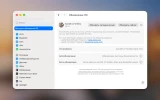
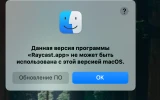
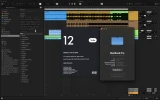
  4. Здравствуйте! На моем MacBook Air M4 после установки релиза от Monter Group 26.0.2 и правильной установки не запускается сама программа. Просто висит на загрузочном экране бесконечно. Даже после принудительного закрытия программы не помогает, все равно уходит в бесконечную загрузку. Может дело в установленном русском языке на программу во время установки? Помогите пожалуйста с решением проблемы. Скрины прикладываю
  5. i am having the following issue with PR 26.3... finally identified that the dman app is repatedly trying to connect to the Adobe servers and failing every time. resulting that the ui is extremely sluggish and at times unresponsive / unbearable to work with


    latest check identified the actual stall:
    Premiere’s interface froze for about 6.6–7.1 seconds.
    Audio processing took only about 0.1 seconds.
    Premiere recorded 97 Adobe sign-in/token failures in under one minute, including “Token not found” and “User Signed Out.”
    So this is not your footage, audio, waveforms, project size, or hardware. Premiere’s Adobe UXP/Home/Discover services are repeatedly failing authentication and blocking the interface. That explains why the lag comes in bursts and why a project can sometimes remain smooth.
    The cache reset wasn’t enough. Next:
    Quit Premiere and Creative Cloud completely.
    Sign out of the Creative Cloud desktop app.
    Restart the Mac.
    Sign back into Creative Cloud, let it finish loading, then open Premiere.
    If it remains sluggish, repair or reinstall Creative Cloud Desktop—the UXP token storage appears broken.
    Even if Creative Cloud currently says you’re signed in, Premiere’s internal log proves its interface services aren’t receiving the account token. Don’t change anything else inside the project yet.


    can something be done about this?? its putting so behind in work that i cant take it anymore.
    Mac mini (2024), macOS Sequoia
  6. Добрый день,
    Скачать Premiere Pro 2025 v25.6.4 by Monter Group, но инструкция не открывается ни каким браузером или ВПН. Можете помочь в решении? Спасибо большое.
    1. SamFisherSpCell2005 Avatar
      SamFisherSpCell2005 для Эдуард Weiss 10.08.2026 / #275118
      Инструкция в формате PDF либо в формате TXT, открывается через предпросмот или TextEdit.
      А в целом зачем она нужна, если там нужно поставить всего 1 файл.
      Автоматический установщик.
      Mac mini (2024), macOS Tahoe
  7. MacBook Pro (14-inch, 2021), macOS Sequoia
  8. MacBook Air (M2, 2022)
    1. MacBook Air (M2, 2022)
  9. Premiere Pro 2026 v26.2.2 by Monter Group для macOS 14 и новее (ARM Only)
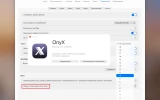
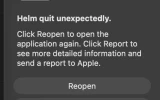
    Установил эту версию программы. Спустя неделю появилось вот это окно. Что может быть причиной и как исправить? Спасибо!
    1. iMac (Retina 5K, 27-inch, 2017), macOS Sequoia
      1. MacBook Air (M1, 2020), macOS Tahoe
        1. iMac (Retina 5K, 27-inch, 2017), macOS Sequoia
  10. I’m having issues with any version of Premiere Pro newer than 24.2.1 when using the Adobe Activation Tool without an internet connection on my Hackintosh (Intel Core i7-12700F, ASRock Challenger Radeon RX 6600, WD Black SN770 1TB NVMe SSD, macOS Sequoia 15.7.8). I can install it without problems, but upon opening the program, it freezes and takes over 5 minutes to open a project or create a new one. Does anyone have a solution?
    Hackintosh, macOS Sequoia
    1. Try installing Premiere Pro with the RiD No Account patch. English version (AIO, prepatched):
      Adobe Premiere Pro v24.6.1 2024 (AIO, UB)
      Adobe Premiere Pro v25.1 2025 (AIO, Intel)
      Adobe Premiere Pro v26.0.0 2026 (AIO, Intel)
      After installation, disable unnecessary helpers with a script: Disable_Adobe_Helpers.zip, unzip and run Disable_Adobe_Helpers.command
      You can download and install the required text-to-speech for versions 2025/26 using utility: Adobe Premiere Pro Speech Files (All)
      iMac (Retina 5K, 27-inch, 2017), macOS Sequoia
      1. Hackintosh, macOS Sequoia
        1. Yes, a similar issue can occur if you block the Premiere Pro with 'TeamProjectsLocalHub' helper in your firewall. I usually remove unnecessary helpers with a script 'Disable_Adobe_Helpers.command', but if you have a distributed team, there's no need to remove it or block it in your firewall.
          iMac (Retina 5K, 27-inch, 2017), macOS Sequoia
          1. Thank you very much, my friend. You and all the other moderators are wonderful and attentive. I finally managed to install versions 25/26, but I noticed an issue with 32-bit float audio. It won't play back on the timeline or in the Source monitor. I wonder if this is actually a bug or something specific to running Hackintosh on Sequoia?
            Hackintosh, macOS Sequoia
            1. vstabr Avatar
              vstabr для alanzito3d 15.08.2026 / #275574
              Perhaps the problem isn't with Premiere Pro, but with the audio device drivers? Check "Sound" in System Preferences and "Audio MIDI Settings" in Utilities. As far as I remember, the audio standard in video production is 16 (24?)-bit, 48,000 Hz. However, I'm no audio app expert. :)
              *For example, my FL Studio 2026 won't output sound to Bluetooth headphones with the "Boom 3D" audio extension installed, even though the driver settings allow for 6 audio channels, 32-bit, 44,100 Hz. :(
              iMac (Retina 5K, 27-inch, 2017), macOS Sequoia
              1. This behavior in version 26 is strange. I managed to resolve my issue with 32-bit float audio by changing the following: Preferences > Audio Hardware > Default Input > No Input; selecting "No Input" was the only way I could get audio output and see the waveform for 32-bit float audio. I only achieved stability using Premiere Pro v26.0 with the RiD Patcher. I am using all Adobe applications following the RiD Patcher recommendations. Thank you very much, as always, for your attention and patience.
                Hackintosh, macOS Sequoia
                1. vstabr Avatar
                  vstabr для alanzito3d 10.09.2026 / #278386
                  I’m genuinely happy for you—you managed to find a solution to the problem. Since this isn't the Adobe Inc. technical support hotline, your experience will definitely be useful to other users. :)
                  iMac (Retina 5K, 27-inch, 2017), macOS Sequoia
  11. MacBook Pro (15-inch, 2016), macOS Monterey
    1. iMac (Retina 5K, 27-inch, 2017), macOS Sequoia
      1. Mac mini (2024), macOS Tahoe
        1. iMac (Retina 5K, 27-inch, 2017), macOS Sequoia
          1. MacBook Air (M1, 2020), macOS Tahoe
            1. iMac (Retina 5K, 27-inch, 2017), macOS Sequoia
  12. Попробовал установить Premiere от Monter Group. Пишет. "Не удалось установить, вышла ошибка с кодом 130". Что это значит? Что делать?
    MacBook Pro (14-inch, 2021), macOS Sonoma
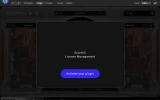
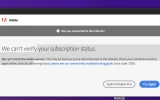
  13. Сделал активацию по инструкции, Premiere работает, но через 2-3 минуты работы появляется вот это окно и постоянно висит - раздражает.
    Можно как-то убрать?
    MacBook Pro (14-inch, 2021), macOS Sonoma
    1. iMac (Retina 5K, 27-inch, 2017), macOS Sequoia
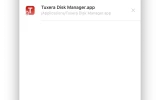
  14. Возможно сталкивался кто-то с такой проблемой после первого запуска? Если закрыть окно и попробовать открыть заново Premier, может вылезти окно входа в аккаунт
    MacBook Pro (16-inch, 2021), macOS Tahoe
    1. iMac (Retina 5K, 27-inch, 2017), macOS Sequoia
Наверх